Depth Camera
Some EgoSuite episodes include a head-mounted depth camera. The current converter writes depth data as compressed image messages, plus per-depth-frame intrinsics and extrinsics:
- Compressed image stream
- Depth camera intrinsics
- Depth camera extrinsics
Topic & Message Type
The following topics correspond to the head depth camera. All channels use protobuf encoding:
- Image topic:
/sensor/camera/head_depth/image - Image type:
foxglove.CompressedImage - Intrinsic topic:
/sensor/camera/head_depth/intrinsic - Intrinsic type:
foxglove.CameraCalibration - Extrinsic topic:
/sensor/camera/head_depth/extrinsic - Extrinsic type:
foxglove.FrameTransforms
Each PNG becomes one foxglove.CompressedImage message with:
frame_id = "head_depth_camera"format = "compressedDepth"datacontaining the original PNG bytes
In the current MCAP conversion, depth frames are stored as foxglove.CompressedImage messages using format = "compressedDepth". The payload is the original depth PNG bytes from the episode. For the 3D depth-map rendering, compressed depth images are expected to be 16-bit grayscale PNGs, with depth values interpreted as millimeters by default.
Camera Intrinsics
Camera publishes its calibration on a dedicated foxglove.CameraCalibration topic. For field definitions (including width, height, intrinsic matrix K, distortion model and parameters D, rectification matrix R, projection matrix P, and frame_id), see CameraCalibration documentation.
Camera Extrinsics
Depth extrinsics are stored as foxglove.FrameTransforms. The converter reads R_w2c and t_w2c from each depth params frame, converts them to camera-in-world pose, and writes:
parent_frame_id = "world"child_frame_id = "head_depth_camera"translation: camera center in the world framerotation: camera orientation in the world frame
For details on converting camera-in-world (C2W) to world-to-camera (W2C) matrices, see the Head RGB Camera page.
Typical Usage
A depth image stores per-pixel distance instead of RGB color. Each pixel value represents Z-axis depth, i.e., distance along the camera optical axis. Together with the camera intrinsics, a depth image can be lifted into 3D points in the camera frame; together with extrinsics, those points can be placed in the world frame.
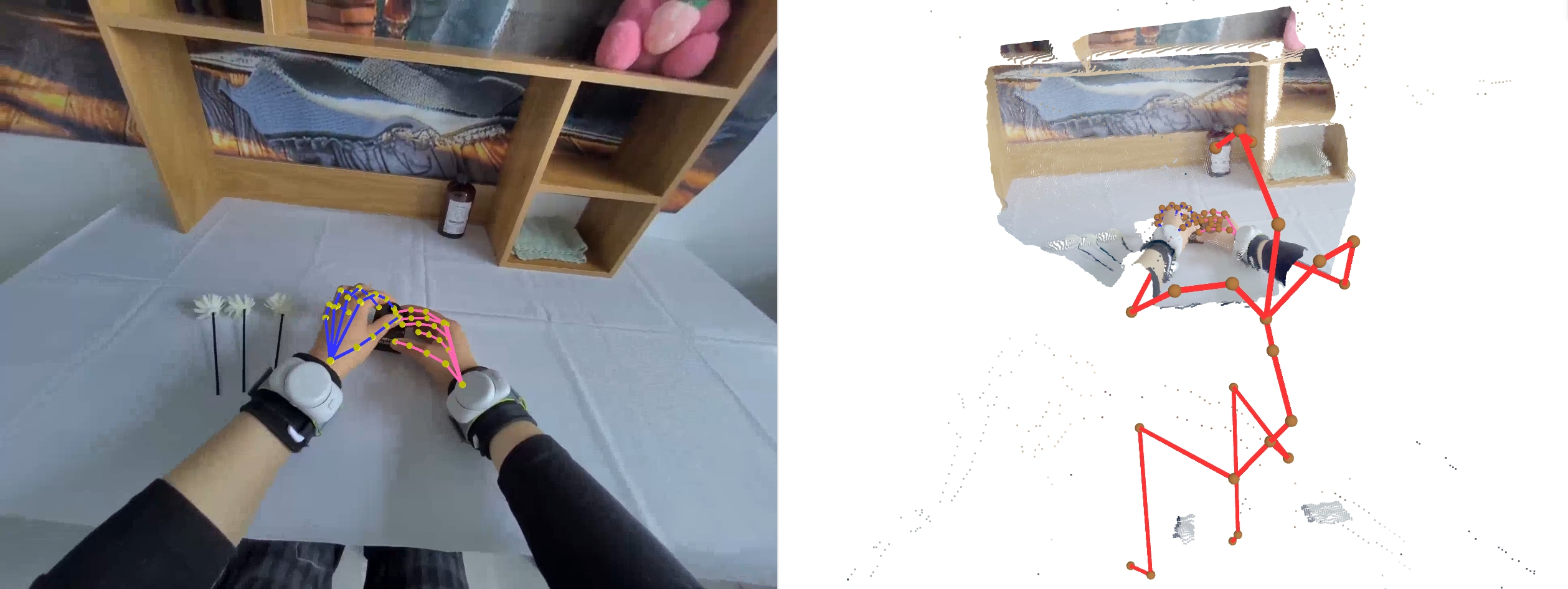
Example point cloud rendered in 3D space.
In the 3D panel, enable /sensor/camera/head_depth/image and set the image Render mode to Depth map. The depth image will be rendered as a point cloud in 3D space. For correct rendering, load the matching topics together:
/sensor/camera/head_depth/image: depth image data./sensor/camera/head_depth/intrinsic: camera calibration used to lift pixels into 3D./sensor/camera/head_depth/extrinsic: transform fromhead_depth_cameraintoworld.
Useful 3D panel settings include:
- Distance type: use Z-axis (default) for depth along the camera optical axis.
- Point size: increase this when the rendered point cloud appears sparse.
- RGB topic: optionally choose a sibling RGB image topic to colorize the rendered depth points.
For more details, see the Foxglove 3D panel depth map documentation.