Head RGB Camera
The EgoSuite headset provides two head‑mounted RGB cameras. In the MCAP files, these cameras appear as separate topics for:
- Compressed video streams
- Raw compressed video streams when source raw MP4 files are included
- Per‑camera intrinsics (calibration)
- Per‑camera extrinsics (pose per frame transforms)
Coordinate Frames
Head cameras use consistent coordinate conventions across the dataset:
-
World Frame:
- All EgoSuite pose data (body and hands) is expressed in a world frame.
- The camera extrinsics relate this world frame to each camera frame.
-
Camera Frame (OpenCV convention):
- Camera projections use the standard OpenCV camera coordinate system:
- axis points forward from the camera.
- axis points to the right in the image.
- axis points down in the image.
- This convention is used for the intrinsic matrix , the distortion model , rectification , and the projection matrix , as well as for the extrinsic rotation and translation .
- Camera projections use the standard OpenCV camera coordinate system:
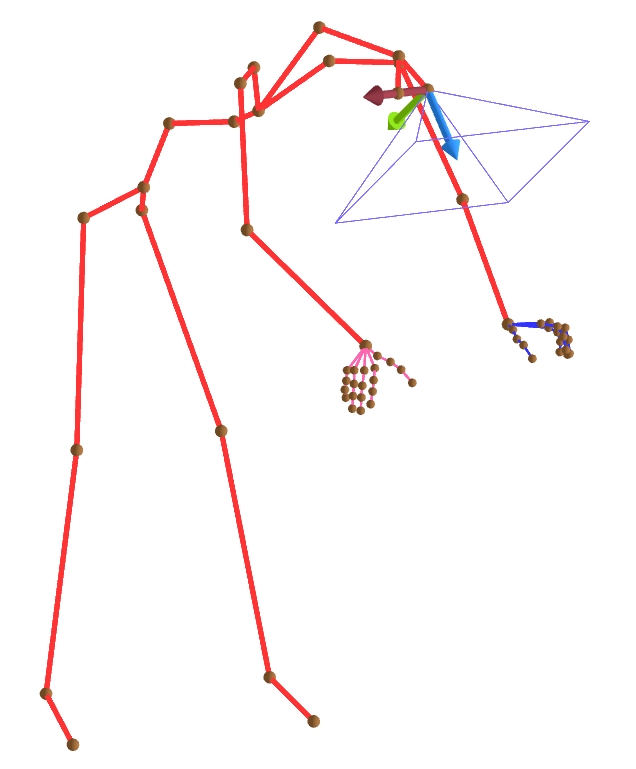
Camera coordinate frame (OpenCV convention): z-axis forward (blue), x-axis right (red), y-axis down (green).
Topic & Message Type
The following topics correspond to the head cameras. All channels use protobuf encoding:
-
Left RGB Camera:
- Video topic:
/sensor/camera/head_left/video - Message type:
foxglove.CompressedVideo - Intrinsic topic:
/sensor/camera/head_left/intrinsic - Intrinsic type:
foxglove.CameraCalibration - Extrinsic topic:
/sensor/camera/head_left/extrinsic - Extrinsic type:
foxglove.FrameTransforms - Raw video topic:
/sensor/camera_raw/head_left/video - Raw video type:
foxglove.CompressedVideo - Raw calibration topic:
/sensor/camera_raw/head_left/calibration - Raw calibration type:
sensor.camera.RawCameraCalibration
- Video topic:
-
Right RGB Camera:
- Video topic:
/sensor/camera/head_right/video - Message type:
foxglove.CompressedVideo - Intrinsic topic:
/sensor/camera/head_right/intrinsic - Intrinsic type:
foxglove.CameraCalibration - Extrinsic topic:
/sensor/camera/head_right/extrinsic - Extrinsic type:
foxglove.FrameTransforms - Raw video topic:
/sensor/camera_raw/head_right/video - Raw video type:
foxglove.CompressedVideo - Raw calibration topic:
/sensor/camera_raw/head_right/calibration - Raw calibration type:
sensor.camera.RawCameraCalibration
- Video topic:
Head camera video topics carry compressed video frames as foxglove.CompressedVideo messages. You can inspect, play back using LW-VIZ or export these streams with LW-EgoSuite Devkit.
Camera Intrinsics
Camera publishes its calibration on a dedicated foxglove.CameraCalibration topic. For field definitions (including width, height, intrinsic matrix K, distortion model and parameters D, rectification matrix R, projection matrix P, and frame_id), see CameraCalibration documentation.
Raw Calibration
The sensor.camera.RawCameraCalibration message on the */calibration topics is an EgoSuite-specific proto, not a Foxglove schema. It carries the rig's original (pre-undistortion) calibration for the raw video stream:
message RawCameraCalibration {
  google.protobuf.Timestamp timestamp = 1;
  string frame_id = 2;
  fixed32 width = 3;
  fixed32 height = 4;

  // Name of the distortion model as recorded by the rig (e.g. "equiDis62", "brown").
  // Not validated or restricted to any fixed set of values.
  string distortion_model = 5;

  // Distortion parameters, in the order defined by distortion_model.
  repeated double distortion_params = 6;

  Intrinsics intrinsics = 7;  // cx, cy, fx, fy
}
Unlike foxglove.CameraCalibration, distortion_model here is a free-form string (e.g. equiDis62, brown) and is not restricted to the model names Foxglove's Image panel recognizes, so this message cannot be consumed directly by Foxglove's calibration UI. It is intended for offline/algorithmic use that needs the rig's original distortion model and coefficients, paired with the raw (distorted) video on the corresponding /sensor/camera_raw/*/video topic.
Camera Extrinsics
Camera extrinsic info is expressed as foxglove.FrameTransforms message.
For field definitions (e.g. parent_frame_id, child_frame_id, translation, rotation), see FrameTransform documentation.
In EgoSuite MCAP files, each extrinsic message represents the position and orientation of the camera in the world frame. The message uses parent_frame_id = "world" and child_frame_id set to the concrete camera frame (head_left_camera or head_right_camera), with translation giving the camera center position and rotation (as a quaternion) giving the camera's orientation.
Computing the W2C (world-to-camera) extrinsic matrix
The EgoSuite MCAP extrinsic camera message uses the C2W (camera-to-world) convention. The following code converts it to a W2C (world-to-camera) extrinsic matrix, which transforms a point from world coordinates to camera coordinates.
import numpy as np
from scipy.spatial.transform import Rotation as R

R_c2w = R.from_quat([quat_x, quat_y, quat_z, quat_w]).as_matrix()
t_c2w = np.array([pos_x, pos_y, pos_z])

R_w2c = R_c2w.T
t_w2c = -R_w2c @ t_c2w
Typical Usage
Common use cases for head camera data include:
- Visualizing egocentric RGB streams aligned with human pose.
- Projecting 3D body or hand keypoints into image space using
CameraCalibrationplusFrameTransforms. - Synchronizing multi‑camera data (head and wrist cameras) using the shared MCAP timeline and topic timestamps.
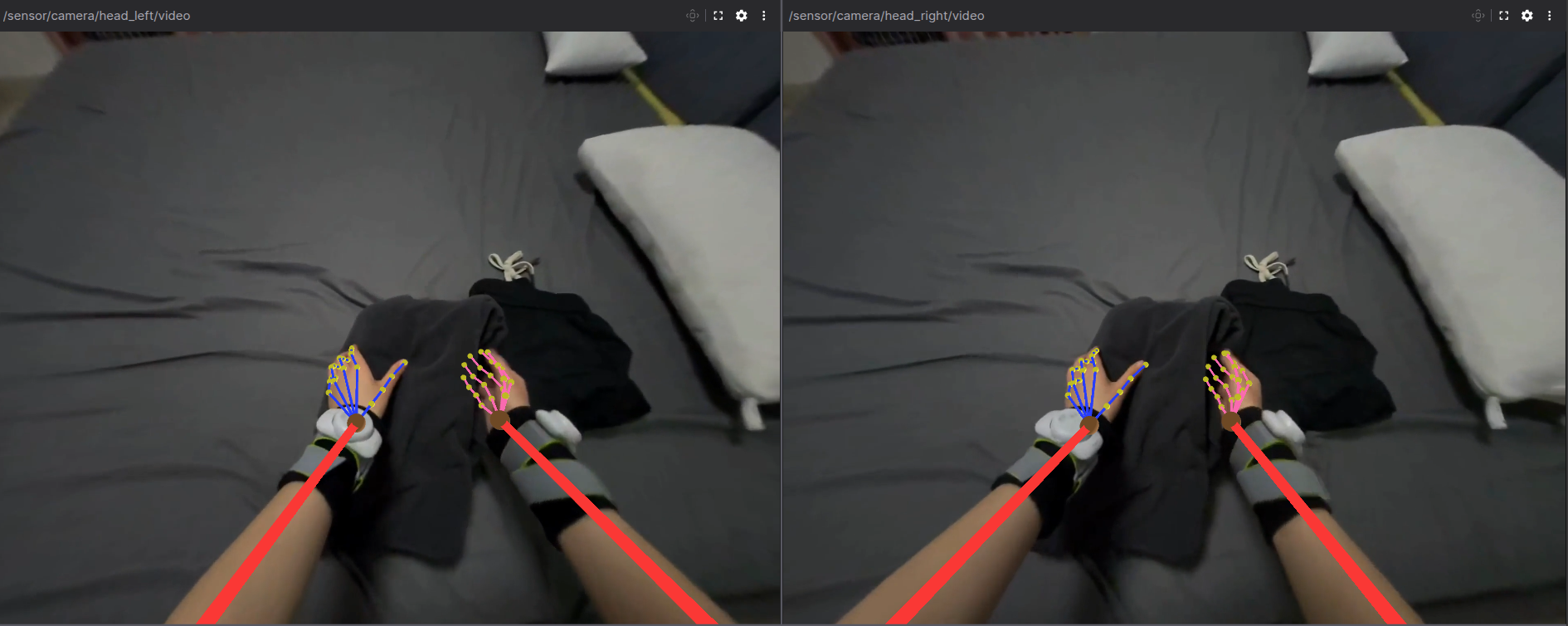
Example head camera image.
Left – view from the left head camera; right – view from the right head camera.
Body pose and hand pose are projected into each image.